
What is FeatPaper?
FeatPaper is a document distribution and analytics platform that turns PDFs and business documents into trackable web links. Send a link instead of a file attachment, and you can see who opened the document, which pages they spent time on, and who left their contact details — all on one screen.
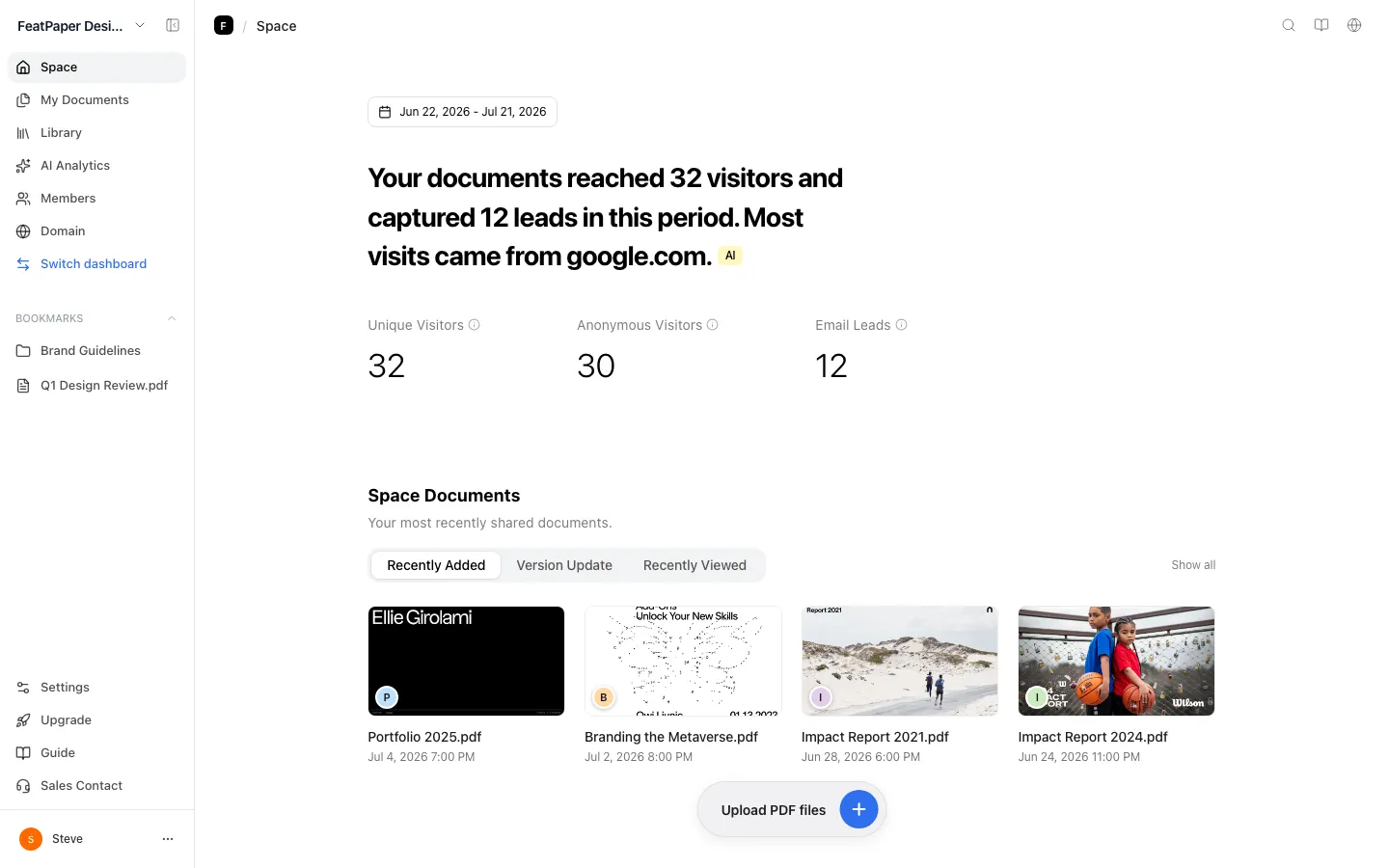
At a glance
Section titled “At a glance”- What it is: A service that turns a PDF into a single trackable web link. Recipients open it in a browser with no login, install, or download.
- Who it is for: Anyone who sends sales proposals, IR decks, company overviews, white papers, or reports outside the company and wants to know how people responded.
- Core features: Five link types (open-access, lead capture, Public web, per-recipient, and form integration), page-level engagement analytics, and view notifications.
- Also included: Access control per link — download blocking, an email allow list, a password, and a viewing period. You can layer video, GIFs, and web embeds on the document, collect contacts with a lead form, replace the file without changing the link, and bundle several documents into a data room.
- Input format: You upload PDFs. You can layer YouTube, Vimeo, MP4, GIF, and web links such as Calendly and Figma on top, and you can also upload through the PowerPoint, Figma, and Adobe Express plugins.
- Plans: Starter (free, $0), Pro ($19/mo), Business ($59/mo with 3 seats), and Enterprise (contact sales).
- Security: Every link is served over HTTPS, and each one carries its own download blocking, email allow list, password, and viewing period. You can shut down every link on a document instantly and turn it back on later.
- Get started: featpaper.com
What FeatPaper does
Section titled “What FeatPaper does”FeatPaper shares PDFs and business documents as links, then shows you how those documents were read. Attach a PDF to an email and you never learn whether it was opened. Send a FeatPaper link and the open time, view count, per-page dwell time, and referrer all land in the document’s detail view.
Recipients install nothing. They tap the link, the document opens in the browser, and they enter details only when you have attached a lead form. On your side, you can send one document to many people through different links and keep their engagement separate. When the content changes, replace the file — the link stays the same.
Who it is for
Section titled “Who it is for”- Sales teams — send a proposal, see whether it was opened and how long the pricing page held attention, then time the follow-up.
- Startups raising a round — send the deck to each investor through a different link and see who read how far.
- Marketers — put a lead form on a white paper, collect contacts, and see how far each contact read.
- Agencies and design teams — deliver work as a link instead of a file, and block downloads so the source never leaves.
- HR and enablement — layer video onto onboarding material and check completion rates.
What you can do with it
Section titled “What you can do with it”- Browser viewing — recipients read the document straight from the link, with no app install or download.
- View analytics — see who opened the document and when, which pages built interest, and where people stopped. Interest level (Hot, Warm, or Cold), views, dwell time, completion rate, top pages, and referrer all appear in one table.
- Five link types — an open-access link anyone can open, a lead capture link that asks for details first, a Public web link you publish so AI search can surface it, per-recipient links issued one per person, and form integration, which ties a form you already run to your view data.
- Access control — set download blocking, an email allow list, a password, and a viewing period per link, and shut down one link or the whole document instantly.
- Document update — swap in a new PDF while keeping the same link, with earlier files kept in version history.
- Lead form and CTA — collect names and emails from people who open the document, and point them to a next step such as booking a meeting.
- Motion content — layer YouTube, Vimeo, MP4, GIF, and web embeds onto a static PDF, and add page-jump or document-link buttons.
- Data rooms — bundle several documents behind a single address.
- AI analytics — ask questions about your view data (Pro and above), and read per-viewer AI summaries and AI interest notes (every plan, charged in AI credits).
- Integrations — push submitted contacts to Notion, Google Sheets, or Zapier, and connect your own site form or Typeform (Business and above).
Find your way around the screens
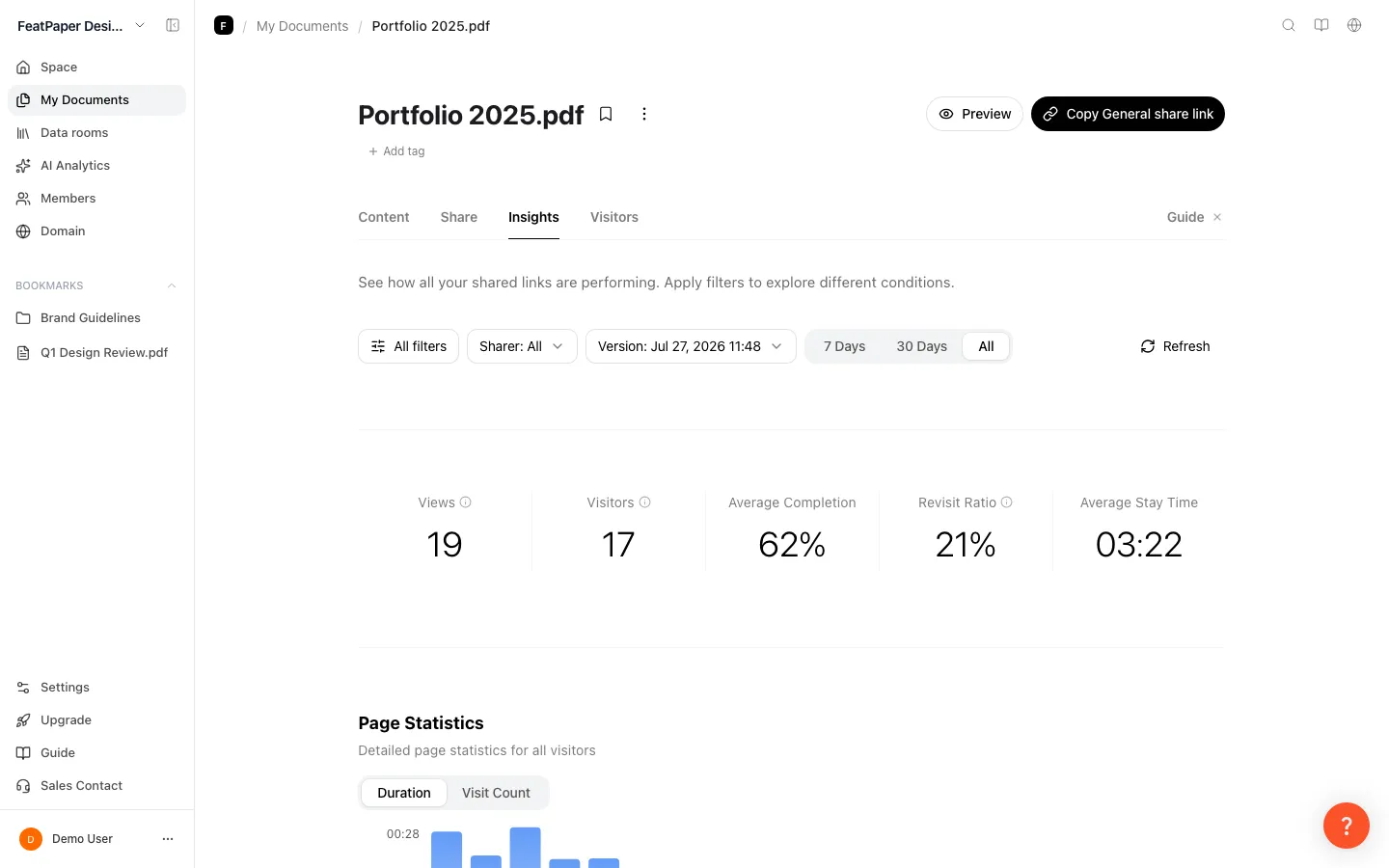
Section titled “Find your way around the screens”The left sidebar moves you between the main screens. Everything about one document — sharing and analytics — happens inside its detail view.
| Location | Menu or tab | What you do there |
|---|---|---|
| Sidebar | Space | Whole-space summary: unique viewers, anonymous viewers, email leads, and referrers. |
| Sidebar | My Documents | Folders and documents. Upload, move, and share. |
| Sidebar | Data rooms | Bundle several documents behind one address. |
| Sidebar | AI Analytics | Ask questions about your view data (Pro and above). |
| Sidebar | Members | Invite teammates and set roles (Business and above). |
| Sidebar | Settings | Space, branding, domain, connections, notifications, plan and billing. |
| Document detail | Content | Document preview and the Manage versions card. Click it to replace the PDF. |
| Document detail | Share links | Create the five link types and open per-link share settings. |
| Document detail | Insights | View metrics, top pages, filters, and an all-viewers list at the bottom. |
| Document detail | Viewers | Person-level lists split into Contacts, per-recipient link viewers, and Interest changes. |
Choose one of the five link types
Section titled “Choose one of the five link types”Pick the link by purpose. Use a lead capture link when you do not know who will open it, and a per-recipient link when you do.
| Link | What the recipient does | When to use it | Plan |
|---|---|---|---|
| Open-access link | Opens the document right away | Anyone should be able to read it | All plans |
| Lead capture link | Enters name, email, and other details first | Posting on your site, a newsletter, or an ad | All plans |
| Public web link | Opens the document right away | Publishing on your site or blog so AI search can surface it | All plans |
| Per-recipient link | Opens the document right away | Sending to one named person | 3 per document on Starter, 10 on Pro, unlimited on Business and above |
| Form integration | Fills in your own site form or Typeform, then opens the link it gets back | Keeping the form you already run and tying it to view data | Business and above |
- Anyone arriving through a per-recipient link skips the lead form, even when the form is on.
- A Public web link cannot carry a lead form. One is issued automatically per document.
- Open-access links, lead capture links, and Public web links are issued automatically and cannot be deleted. Only per-recipient links can.
- Form integration isn’t a link you copy and send. You set it up in the Integrations section at the bottom of the Share links tab.
Know which formats and integrations work
Section titled “Know which formats and integrations work”- Upload: PDF. The PowerPoint, Figma, and Adobe Express plugins convert to PDF for you.
- Layered on the document: YouTube, Vimeo, MP4, GIF, web embeds such as Calendly and Figma, page jumps, and document links.
- Plugins: PowerPoint, Figma, Adobe Express.
- Data integrations: Notion, Google Sheets, Zapier, and external forms such as your own site form, Typeform, or Tally — Business and above.
- Notification channels: email and Slack, configured per account.
Compare the plans
Section titled “Compare the plans”Starter covers almost every feature. Paid plans differ in how long and how deeply you can read your view data and in team and automation. All amounts are USD, shown as a monthly equivalent.
| Plan | Price (monthly equivalent) | Monthly uploads | PDF · video size | Per-viewer detail | Monthly AI credits |
|---|---|---|---|---|---|
| Starter | $0 | 10 | 30MB · 30MB | 7 days after upload | 30 |
| Pro | $19/mo, or $16 billed yearly | 30 | 100MB · 50MB | Full history | 1,000 |
| Business | $59/mo, or $46 billed yearly | 30 per seat | 300MB · 100MB | Full history | 3,000 |
| Enterprise | Contact Sales | Custom | Custom | Full history | Unlimited |
- Monthly uploads count new documents and version updates together.
- View counts and summaries have no time limit on Starter. The 7-day window applies only to per-viewer detail.
- Business includes 3 seats. Extra seats are $12/mo each ($10/mo billed yearly) and raise your upload limit and AI usage too.
- Download blocking, viewing period, CSV export, branding, and AI analytics start at Pro.
- Member invites, role permissions, Notion, Google Sheets, Zapier, and form integration start at Business.
- Custom domain, SSO, audit log, multi-space management, and invoicing are Enterprise.
- Lead forms, Public web links, and version updates are available on every plan.
See the full breakdown, seats, and credits in Compare plans and pricing.
Start for free
Section titled “Start for free”Starter costs nothing. Sign up at featpaper.com, upload a PDF, and share the link — your first view data lands within minutes. Storage and share links are unlimited on Starter, and you can collect contacts with a lead form. Getting started walks you through the first upload.
Lock down who can open a link
Section titled “Lock down who can open a link”Document links are served over HTTPS. You can set all of the following per link, and link settings override the document defaults.
- PDF Download blocking — Pro and above
- Viewing period (in 7 days, in 1 month, or a date you pick) — Pro and above
- Email allow list — only listed addresses can open it. Use
@example.comto allow a whole domain - Password — the viewer enters a password to open the link
- Disable this link now — shuts down that one link
- Disable this document’s link now — shuts down every link on the document regardless of expiry
The email allow list and the password are never inherited from document settings — set them on each link. Disabling is a soft block, so the analytics you have already collected stay in place. Anyone opening an expired or disabled link sees a message saying the link is invalid or has expired. If the whole document is off, they get a request-access screen instead. Share with a link covers the setup.
Ways to use this
Section titled “Ways to use this”FeatPaper is worth more when you combine the link type, the access controls, the analytics, and an integration than when you use one link on its own. Three combinations people reach for most.
Attach a PDF to an email and you never learn whether it was opened, while the file travels on to whoever the recipient forwards it to. Send a cloud-drive link and you may see that it was opened, but never which page they stopped on or who left their details — and swapping the file often changes the address.
Good to know
Section titled “Good to know”- Direct upload accepts PDF only. Convert PPTX and DOCX first, or use a plugin.
- Exporting the same file from a plugin again creates a new document instead of updating the old one. Use the version update to keep the link.
- Notion, Google Sheets, and Zapier integrations are per document. You cannot set them per link.
- There is no per-document Slack integration for storing data. Slack is an account-level notification channel only.
- The communication CTA limit is 3 on both Starter and Pro, so it is not a reason to move to Pro.
- Opening your own document while signed in as the owner still counts in the statistics. Keep test views out by registering your office IP under Analytics Exclusion.
Frequently asked questions
Section titled “Frequently asked questions”What is FeatPaper?
A document distribution and analytics platform that turns PDFs and business documents into trackable web links. Send a link instead of a file and you can see who opened it and which pages held attention, with per-link access control such as download blocking, passwords, and viewing periods.
Does the recipient need to sign up or install anything?
No. Anyone with a share link opens the document straight in a browser — no sign-up, app install, or plugin. An account is only needed by the person who uploads, shares, and analyzes.
How far can I go on the free Starter plan?
Starter gives you unlimited document storage and unlimited share links. You also get 10 uploads a month (new documents and version updates combined), 30MB each for PDFs and video, 3 videos and GIFs per document, 3 per-recipient links per document, 1 data room, and 30 AI credits a month. Lead forms work on Starter too. View counts and summaries never expire — only per-viewer detail is capped at 7 days after upload. See Compare plans and pricing.
Do you support formats other than PDF?
Direct upload is PDF only. On top of an uploaded PDF you can layer YouTube, Vimeo, and MP4 video, GIFs, and web links such as Calendly and Figma. Material made in PowerPoint, Figma, or Adobe Express is converted to PDF by each plugin. See Upload a document.
Can I tell who opened a document, person by person?
Viewers who leave an email or phone number are grouped into one person. When you already know the recipient, issue a per-recipient link and the link alone identifies them. Anonymous reads with no details appear as separate rows. See How to check if someone opened your document.
How is this different from DocSend?
FeatPaper pairs document tracking with motion content and an Public web link. You can layer video, GIFs, and web embeds onto the PDF, and publish the same document on your site or blog so AI search can cite it. Lead forms work on free Starter, and view counts and summaries carry no time limit.
Can a team work in it together?
On Business and above you can invite teammates. A space has two roles, Admin and Member, and each folder can be shared as can edit or can view. Business includes 3 seats, and each extra seat raises the monthly upload limit and AI usage. See Invite your team.
Can links use our own domain?
A custom domain is an Enterprise feature. Once applied, share links go out on your company domain. Removing the “Powered by FeatPaper” mark and adding your own logo (Settings > Space > Logo Settings, admins only) start at Pro. See Custom domain.
Key points
Section titled “Key points”- FeatPaper turns PDFs into trackable web links and shows opens, page-level engagement, and collected contacts in one place.
- Recipients open documents in a browser with no sign-up or install.
- There are five link types — open-access, lead capture, Public web, per-recipient, and form integration — and access control and notifications are set per link.
- Plans are Starter ($0), Pro ($19/mo), Business ($59/mo with 3 seats), and Enterprise (contact sales). On Starter only per-viewer detail is capped at 7 days after upload.
- Lead forms, Public web links, and version updates work on every plan; download blocking and CSV start at Pro; team features and integrations start at Business.